
|
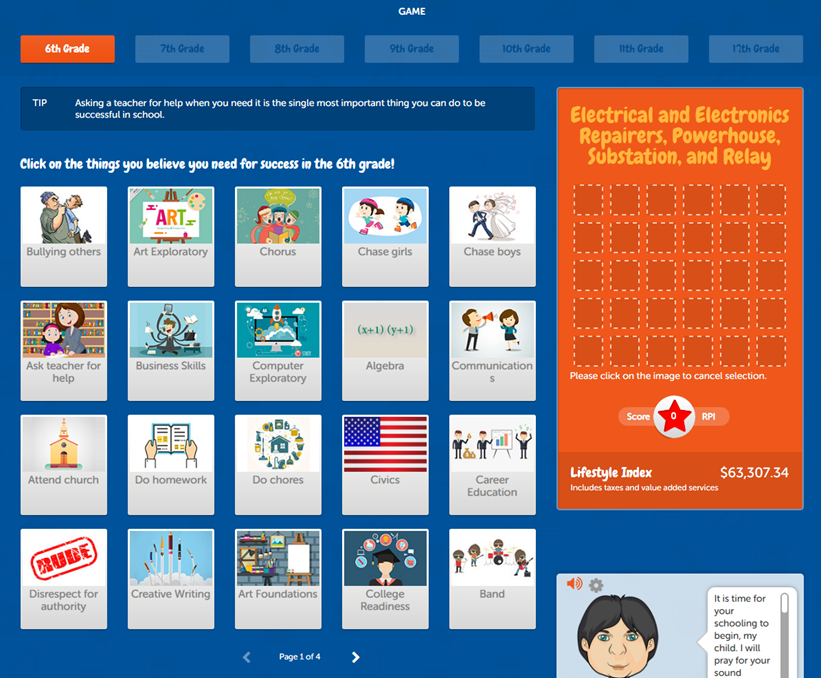
Game Item Page selectors |
Allows you to quickly go from game item page to game item page by selecting page number, previous or next. |
|
Skip to Graduation button |
Allows you to skip straight to “Graduation” without completing all grades. For grades 6-10, this button is only eligible after you have completed one grade. For grade 11, this button is eligible without completing any grade. |
|
Game Item Pages - Middle School (6th-8th) |
There are 4 pages of items to select from. Each page contains 20 items. Items could be a required class, optional class or a positive/neutral/negative behavior. Clicking an item places it on the palette. |
|
Game Item Pages - Middle School (9th-12th) |
There are 7 pages of items to select from. Each page contains 20 items. Items could be a required class, optional class or a positive/neutral/negative behavior. Clicking an item places it on the palette. |
|
Palette |
This area displays any selected items. Double-clicking any item on the palette will remove an item. |
|
Score/RPI star |
Displays a color and your game score. Green means you have chosen the correct path. Yellow means you have chosen a mostly correct path. Red means you are heading in the wrong direction. If the star remains in red you will be unable to continue. Every item you select can add or subtract points from your score. As you move forward through the grades your score is carried forward. Your beginning score in the next grade is the ending score in your last grade. |
Comments
0 comments
Article is closed for comments.