
|
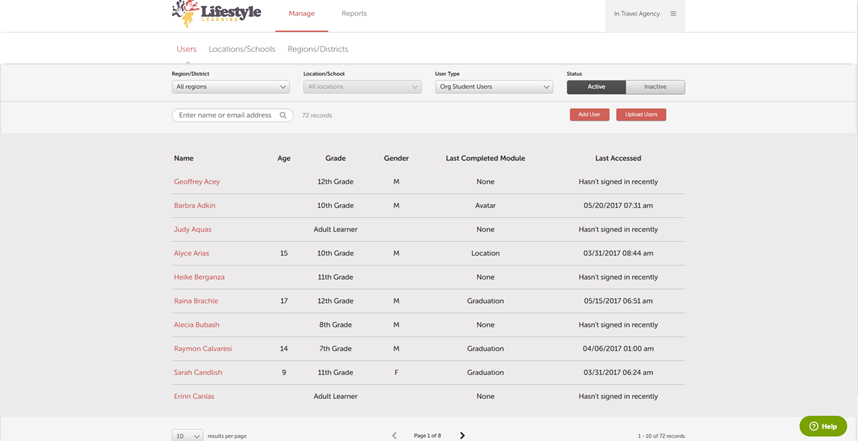
Results per page dropdown |
Allows you to choose how many users display on a page. The default is 10. |
|
Page selectors |
Allows you to quickly go to the next page and back. |
|
Region/District dropdown |
Defaults to all if multiple regions/districts exist. Allows you to select All or a specific region/district. |
|
Location/School dropdown |
Defaults to all if multiple locations/schools exist. Allows you to select All or a specific location/school. |
|
User type |
Default is for org student users. Allows you to also select org staff users. |
|
Status toggle |
This is the default (displays in a darker color) is Active. |
|
Search box |
Allows you to search for a user by name or email address. Can be Active or Inactive. Active displays only active users. Inactive displays inactive users. |
|
Name column |
Clicking on the column header sorts in ascending or descending order. |
|
Last Accessed column |
Clicking on the column header sorts in ascending or descending order. |
|
Add User button |
Allows you to add a new user. |
|
Upload Users button |
Allows you to upload multiple users by using a csv file. |
Comments
0 comments
Article is closed for comments.